Benchmarks
TL;DR
Building a model with ten million variables and their constraints took 8.6 s with polarobi and 90.3 s with the fastest alternative, a plain gurobipy loop: 10.5 times faster, with identical models. At a million rows it was 0.8 s against 7.8 s. polarobi was the fastest build at every size, from 1.7 times faster at a thousand rows, and gurobipy-pandas the slowest from a million rows on.
Build Time
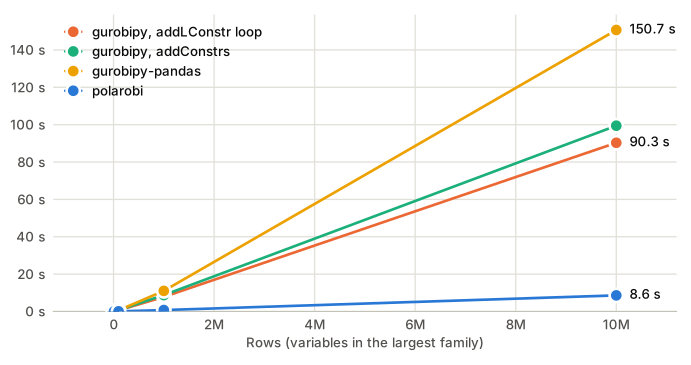
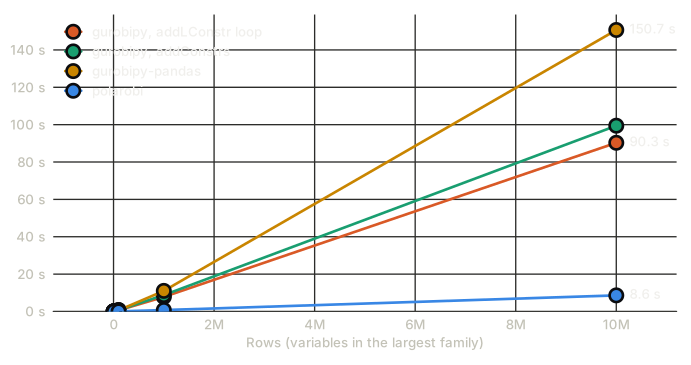
| Rows | gurobipy, addLConstr loop | gurobipy, addConstrs | gurobipy-pandas | polarobi | Speedup |
|---|---|---|---|---|---|
| 13 ms | 22 ms | 27 ms | 8 ms | 1.7x | |
| run 1 | 13 ms | 22 ms | 27 ms | 8 ms | |
| run 2 | 13 ms | 22 ms | 27 ms | 7 ms | |
| run 3 | 13 ms | 22 ms | 26 ms | 8 ms | |
| 70 ms | 104 ms | 95 ms | 18 ms | 3.8x | |
| run 1 | 71 ms | 103 ms | 94 ms | 18 ms | |
| run 2 | 69 ms | 104 ms | 96 ms | 19 ms | |
| run 3 | 69 ms | 104 ms | 95 ms | 18 ms | |
| 614 ms | 755 ms | 638 ms | 70 ms | 8.8x | |
| run 1 | 610 ms | 746 ms | 632 ms | 71 ms | |
| run 2 | 612 ms | 797 ms | 644 ms | 69 ms | |
| run 3 | 619 ms | 723 ms | 638 ms | 69 ms | |
| 7.8 s | 8.8 s | 11.0 s | 762 ms | 10.2x | |
| run 1 | 7.9 s | 8.8 s | 10.9 s | 772 ms | |
| run 2 | 7.7 s | 8.8 s | 10.9 s | 762 ms | |
| run 3 | 7.8 s | 8.7 s | 11.2 s | 751 ms | |
| 90.3 s | 99.4 s | 150.7 s | 8.6 s | 10.5x | |
| run 1 | 90.9 s | 99.4 s | 150.9 s | 8.6 s | |
| run 2 | 90.5 s | 99.4 s | 149.7 s | 8.6 s | |
| run 3 | 89.6 s | 99.5 s | 151.4 s | 8.6 s |
Times are the mean of three runs after an untimed warm-up, for building the whole model including the final update(); expand a size to see each run. The speedup divides the mean of the next fastest build by polarobi's, and hovering it names that build: the gurobipy addLConstr loop at every size. All four builds produced the same Fingerprint, and the same variable and constraint names, at every size.
Where the Time Goes
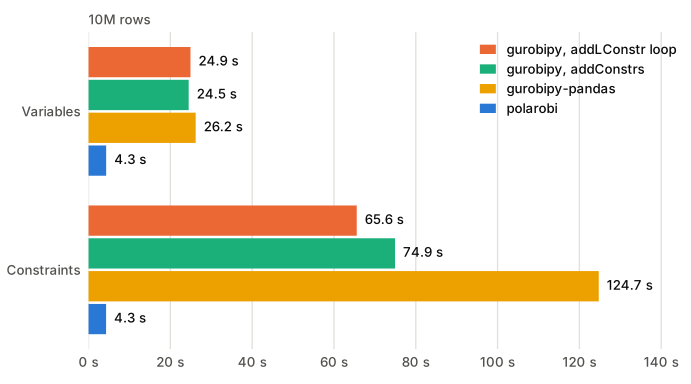
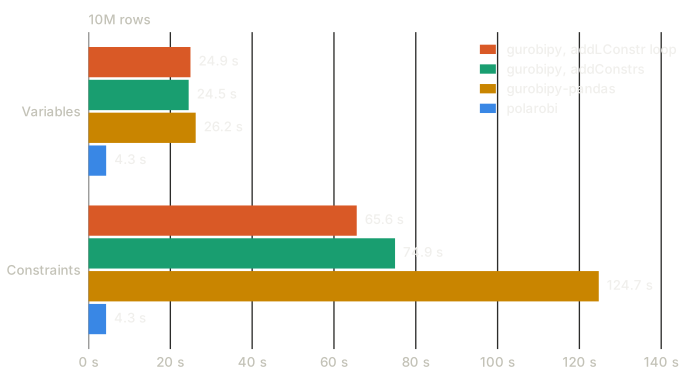
Constraints are where the other builds lose most: every term is an entry in a LinExpr, and every constraint a separate Python object on its way to Gurobi. In the plain gurobipy builds each term is also a tuple lookup into a tupledict; addConstrs adds a comparison object per constraint and its own bookkeeping on top. gurobipy-pandas builds its expressions with pandas arithmetic over Series of Var objects and then adds one constraint per row, which made it the slowest build from a million rows on. polarobi groups the terms in polars and hands each family to Gurobi in one call. For variables, all builds create one gurobipy handle per variable, which is half of polarobi's remaining time; see How it Works.
The Model
A typical allocation model, generated from a fixed seed:
x: one binary variable per option, an (order, factory, week) combination with a quantity and a value. The row count is the number of options, about four per order, over 50 factories and 52 weeks.assign: every order is chosen at most once.capacity: the quantity per factory and week stays within its capacity.y,moq_min,moq_max: a factory week either produces nothing or at least a minimum quantity, a big-M link through one binary variable per factory week.
The gurobipy builds are written the way such models usually are: iter_rows() into addVars, and group_by().agg() with tupledict lookups into one LinExpr per key. They differ only in how they add the constraints:
addLConstrloop: oneaddLConstrcall per constraint.addConstrs: oneaddConstrscall per family, over a generator of the keys.
Both build each expression once; the also common x.sum(order, "*", "*") per constraint would scan the whole tupledict every time and be far slower.
A third build uses gurobipy-pandas, written as its documentation suggests: gppd.add_vars on frames indexed by their keys, groupby().sum() into one LinExpr per key, and gppd.add_constrs. Its inputs are converted to pandas before the clock starts. It adds variables with one addMVar call, but constraints one addLConstr call per row.
Nothing is solved, so no license size limits apply.
The Machine
The results on this page come from a virtual machine on Google Cloud, so that anyone can rerun them on the same hardware:
- Machine:
c4-highmem-16ineurope-west1-c, an Intel Granite Rapids CPU with one vCPU per core, limited to 4 visible cores, and 124 GB of memory. - System: Ubuntu 26.04 minimal (
ubuntu-minimal-2604-resolute-amd64), Linux 7.0.0-1014-gcp. - Software: Python 3.14.7, polarobi 0.1.6, polars 2.0.0, gurobipy 14.0.0b1, gurobipy-pandas 1.2.2 and pandas 3.0.6.
All its cores are of one type, so the run needs no CPU pinning. From a million rows on, the three runs of every build stayed within 3% of each other; below that, where a run takes milliseconds, within 6%, except for addConstrs at 100,000 rows, which differed by 10%.
Caveats
- Your mileage may vary. Results will differ across hardware, models, data shapes, and system load—the ratios within a single run are more telling than the absolute times. There is no magic: expect polarobi to be faster where creating millions of small interim Python objects has a noticeable impact on build time, or when a lot of data crosses the Python-to-Gurobi boundary.
- Model building only. Solving takes the same time either way, since the models are identical.
Reproducing
The benchmark lives in benchmarks/ in the repository:
uv run --group bench python benchmarks/build_model.py --sizes 1000 10000 100000 1000000 10000000
uv run --group bench python benchmarks/plot.py benchmarks/results/results.json
The first command builds the model all four ways at each size, checks that the fingerprints and names match, and writes the timings, machine, package versions and settings to benchmarks/results/<system>.json; the results on this page are ../benchmarks/results/gcp-c4-highmem-16.json. Without --sizes it runs 10K to 10M rows; 10M rows need well over 11 GB of free memory, since gurobipy-pandas holds a pandas copy of the inputs. --repeats and --seed change the run. The second command draws the figures on this page from a result file and prints the table.
--cpus pins the run to the given logical CPUs. On CPUs with performance and efficiency cores, such as Intel's 12th generation and later, pick one thread per performance core: otherwise the operating system moves the run between core types, and identical builds differ by a factor of two.